Inspect, stop and start a component
Purpose
Use this procedure for planned scanner maintenance or to start a component previously stopped by an administrator. Stopping a scanner affects jobs. Agree a maintenance window and let active scans finish in DerScanner.
Before you begin
Check the selected server. In a distributed installation, the same module name can appear on multiple nodes. Record the intended node name and address. Do not combine an upgrade or restore with manual component shutdown.
Procedure
- Open Overview. Check the server name, installed version and overall state.
- Open Products. Find the module and read its state and any problem description.
- If the module runs on a remote node, identify that server and select it before taking action.
- For a running component with power controls, click Stop. Remove changes the installation composition and is a different operation.
- Read the confirmation, verify the component and confirm. Open the resulting operation and wait for completion.
- Return to Products. Check that the selected component is shown as stopped by the administrator and that dependent components have the expected state. Stopping Core turns off the whole product and is not equivalent to stopping one scanner. While an unfinished operation (an update, return, restore or module switch) holds the product, a module it stopped reads Stopped by an unfinished operation: finish that operation first (see Recover after an interrupted update, restart or lost connection). A component that runs on another server and cannot be asked from the screen you are on (for example Builder) reads Not checked from here, not Running.
- After maintenance, click Start for the same component. Wait for the operation and state refresh.
- To restart, complete the stop before starting again. Repeated clicks are not a restart procedure.
- Open DerScanner and run a job on the serviced scanner. With multiple agents, verify the intended node.
Troubleshooting
Power controls appear only where DCP supports them. A missing button is not a reason to remove the component. If startup fails, open Log in the module row and check the error time, dependencies and disk space. Collect diagnostics using Locate an operation and collect support diagnostics before retrying.
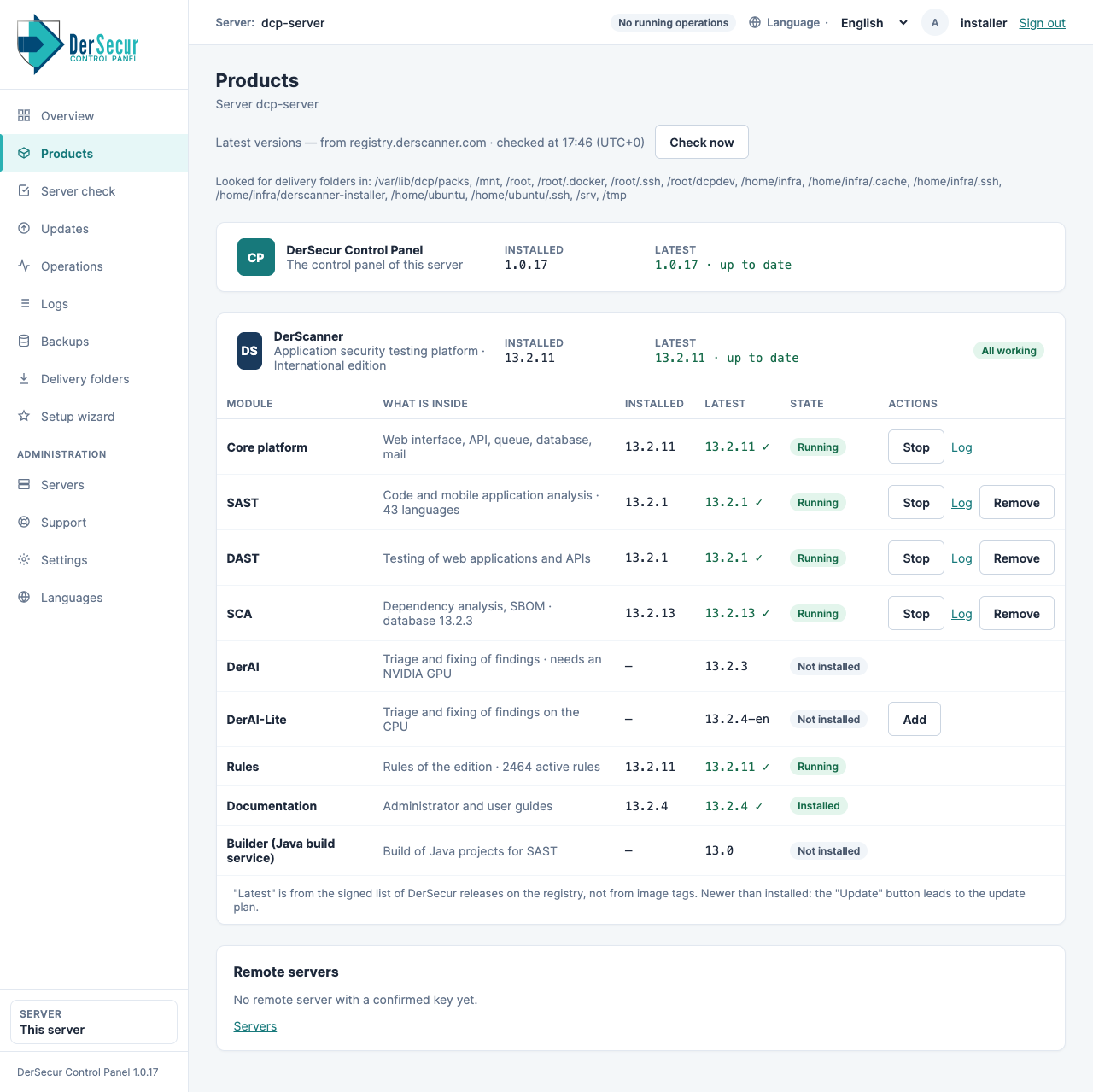
Products: each module with its state and its controls.